
This week we focus on technology disruption and mixed reality. Our practical session focuses on augmented reality tools, including Aurasma.
Practising Teacher Criteria
12.i. systematically and critically engage with evidence and professional literature to reflect on and refine practice
Whakataukī
Ka mate te kāinga tahi, ka ora te kāinga rua.
There is more than one way to achieve an objective.
There is more than one way to achieve an objective.
Disruptive Technologies
"Disruptive technologies typically demonstrate a rapid rate of change in capabilities in terms of price / performance relative to substitutes and alternative approaches, or they experience breakthroughs that drive accelerated rates of change” (Manyika, et al. 2013).
"The more overdue a disruption is, the more sudden it is when it finally occurs, and the more off-guard the incumbents are caught"...“eliminating the bottom 99% of workers in [the teaching] professions” (Gade, 2014)
One of the world's largest...
- ...taxi companies owns no taxis (Uber)
- ...accommodation providers owns no real estate (AirBnB)
- ...phone companies owns no telecom infrastructure (Skype)
- ...retailers has no inventory (Alibaba)
- ...movie houses owns no cinemas or physical stores (Netflix)
- ...media companies owns no content (Facebook)
- ...software vendors doesn’t write the apps (Apple / Google)
Which careers are a safe bet?
In 2015 the BBC set up a web page entitled "Will a robot take your job?" Try typing in job titles into the search box to find out the likelihood that they could be automated within the next two decades.
http://tinyurl.com/willarobottakeyourjob (in class)
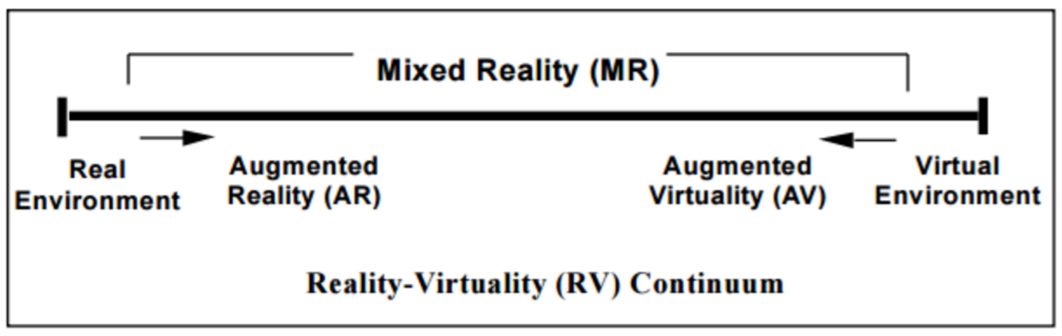
The Reality Continuum
From Milgram, Takemura, Utsumi & Kishino (1994). Between the two extremes of the real environment and a completely virtual one, the continuum goes from overlaying reality with a few additional elements on the left, to the occasional introduction of real elements into a digital environment (e.g. the user’s hand) on the right
Virtual Reality
- Creates immersive, computer generated environments which replaces the real world
- The user is completely immersed in an artificial world and cut off from the real world
- Senses are mediated by the virtual world
Popular VR headsets include Oculus Rift and Google Cardboard. Google Expeditions, which you can use with Cardboard, is a virtual reality teaching tool that lets you lead or join immersive virtual trips all over the world — get up close with historical landmarks, dive underwater with sharks, even visit outer space! It was released free to the public on 27 June 2016 but is not totally free, especially for the whole class and with full features. Google Tilt Brush is another recent VR application that supports the creation of 3D virtual art..
Augmented Reality
- Closer to the real world
- Adds graphics, sounds and smells to the natural world as it exists
- User can interact with the real world, and at the same time can see both, the real and the virtual co-existing
- User is not cut off from reality
- Sense of presence in real world is maintained
AR Terminology
Overlay: An image or graphic superimposed over an Image Target
Image Target (also: trackable, trigger, marker, AR target): The image recognized by the App, which launches the AR experience. Images with high contrast and unique features with sharp edges are key pillars in supporting image recognition.
Individual task with Aurasma
Create an ‘aura’ with your mobile device. There are some instructions on the portal if you find it hard to work out how to get going (Android and iOS versions are rather different)
- Create a video - 3 seconds talking about yourself
- Create a trigger image by drawing a detailed picture of your face
- Use the image to trigger the video
OR
If you are already an Aurasma expert, work with Aurasma Studio with your Laptop. Use Firefox, not Chrome, since many of the features do not work in Chrome.
Ideas for using AR
- A Student Photo Wall: Set up a display of student photos in the classroom linked to a personal student videos about the individual student that can be shared with parents and visitors.
- Book Reviews: Have students record a video of themselves giving an review of a book. The trigger image to launch the video review could be the book cover, a picture of the student or an image they have drawn. Afterward, other students/teachers can scan the cover of the book and instantly access the review.
- Parent or Inspiring Role message: Source a recording from an inspirational speaker or record a message from a parent/friend of the student that provides words of encouragement to the student. Attach a trigger image to student desks or cover of their books.
- Year books/School magazines: Add an AR to printed school publications and include video profiles from sports events, school plays or award ceremonies as a rich memory of school activities.
- Word Definition Walls: Students can record themselves providing the definitions to different vocabulary words on a word wall.
- Lab Safety/Safety Messages: Put trigger images linked to safety videos around a science laboratory/workshop so that when students scan them, they can learn the different safety procedures and protocols within the learning environment.
References
Gada, K. (2014). The Education Disruption : 2015, Retrieved from http://www.singularity2050.com/2014/07/the-educati...
Manyika, M. et al. (2013). Disruptive technologies: Advances that will transform life, business, and the global economy. McKinsey & Company.
Milgram, P., Takemura, H., Utsumi,A. & Kishino, F. (1994). Augmented Reality: A class of displays on the reality-virtuality continuum. In Proceedings SPIE 2351, 282-292.

No comments:
Post a Comment